Pipes
Pipes
Pipelines 已过时并被标记为 legacy,不再推荐使用。 Pipeline 可以以 pipe 或 filter 形式运行;这两种形式现在都有进程内的替代方案,它们内置、配置更简单、且无需额外的 worker 容器:
- Pipeline pipe(自定义 provider、RAG、请求路由)→ Pipe Function
- Pipeline filter(消息预处理/后处理)→ Filter Function
本页面仅供现有部署参考。
Pipes 是处理输入并生成响应的独立函数,在向用户返回结果之前,可能会调用一个或多个 LLM 或外部服务。使用 Pipes 可以进行的操作示例包括:检索增强生成(RAG)、向非 OpenAI LLM 提供商(如 Anthropic、Azure OpenAI 或 Google)发送请求,或直接在 Web UI 中执行函数。Pipes 可以作为 Function 托管,也可以托管在 Pipelines 服务器上。示例列表维护在 Pipelines 仓库中。一般工作流如下图所示。

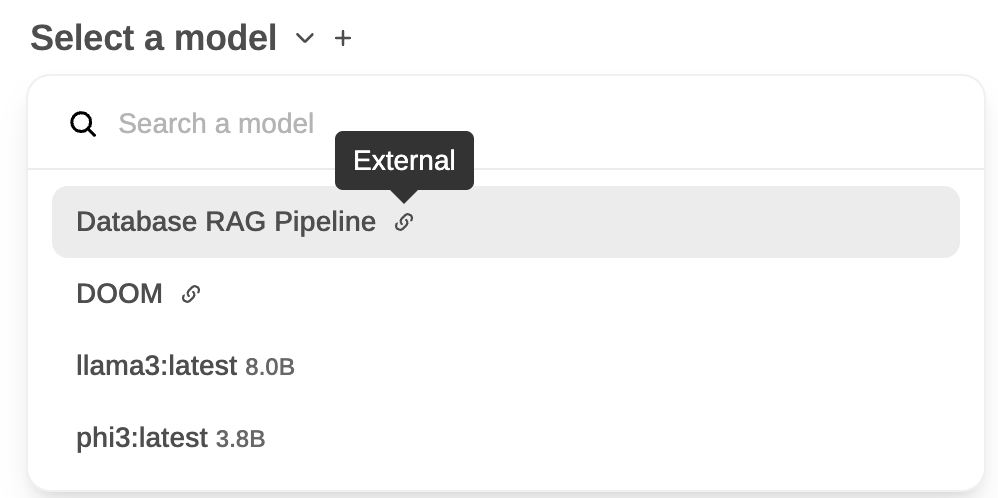
在 WebUI 中定义的 Pipes 显示为带有"External"标识的新模型。以下是两个 Pipe 模型 Database RAG Pipeline 和 DOOM 与两个自托管模型并排的示例:
流式响应格式
Pipes 可以返回单个 str 或迭代器/生成器。流式传输时,每个 yield 的项可以是:
-
纯字符串 — 被视为助手可见的文本内容,随到随追加到消息中。这是最简单的形式,也是大多数代理 Pipeline 应用于常规输出的形式。
-
OpenAI 兼容的 SSE chunk 字典 — 与
/v1/chat/completions流式响应形状相同,即:{"choices": [{"delta": {"content": "..."}, "finish_reason": None}]}当你需要设置
content以外的字段时使用(例如最终 chunk 上的finish_reason)。
对于自包含流,使用单个终止 chunk 关闭它:
yield {"choices": [{"delta": {}, "finish_reason": "stop"}]}finish_reason 应恰好出现一次,在末尾,对于自行处理工具执行的 Pipeline,它应始终为 "stop" — 而不是 "tool_calls"(参见下一节)。
自包含代理与 delta.tool_calls
这是构建代理 Pipeline(LangChain、LlamaIndex、自定义规划器,任何执行自己工具并流式返回结果的东西)时最大的陷阱。
chunk 中的 delta.tool_calls 意味着 "请客户端帮我执行这个 tool call"。当 Open WebUI 的中间件看到它时,tool executor 会接住这个调用、执行它、附加一条 role: "tool" 消息,然后向同一个 pipeline 发出续接请求。这个循环由 CHAT_RESPONSE_MAX_TOOL_CALL_ITERATIONS(默认 256;在 v0.9.6 之前的版本上为 CHAT_RESPONSE_MAX_TOOL_CALL_RETRIES,默认 30)作为上限。
如果你的 Pipeline 已在内部执行了工具,发出 delta.tool_calls 会让 Open WebUI 再次尝试执行它——由于 Pipeline 在每次重试时都会发出相同的调用,在达到重试上限之前你会得到 30 份响应叠加在一起。如果你在流中途设置 finish_reason: "tool_calls" 也会发生同样的情况。
经验法则:
- 模型正在调用 Open WebUI 应该运行的工具 → 发出
delta.tool_calls,以finish_reason: "tool_calls"终止,让中间件调用工具并重新进入你的 Pipeline。 - Pipeline 正在运行一个拥有自己工具的代理 → 不要发出
delta.tool_calls。使用下面描述的<details type="tool_calls">块将工具执行渲染为内容。
将工具执行渲染为内容
Open WebUI 自带的服务端 tool 路径会把已完成的 tool 执行渲染为消息内容中的 <details type="tool_calls"> 块。你可以在 agent pipeline 中发出同样的块,从而获得与之完全一致的“Called <tool>”徽章,并支持展开查看参数 + 结果:
import html
import json

call_id = "call_123"
name = "get_weather_test"
arguments = {"location": "SF"}
result = {"temp_c": 22}

details_block = (
    f'<details type="tool_calls" done="true" '
    f'id="{call_id}" name="{name}" '
    f'arguments="{html.escape(json.dumps(arguments))}">\n'
    f'<summary>Tool Executed</summary>\n'
    f'{html.escape(json.dumps(result, ensure_ascii=False))}\n'
    f'</details>\n'
)
将 details_block 作为内容 yield——可以直接作为字符串(在 Pipelines 服务器上最简单),也可以放在 delta.content chunk 中:
# Simplest — works on Pipelines servers:
yield details_block

# Or as an explicit OpenAI chunk:
yield {"choices": [{"delta": {"content": details_block}, "finish_reason": None}]}
运行了一个工具的自包含代理的最终流从头到尾如下所示:
def pipe(self, user_message, model_id, messages, body):
    # 1. Pre-tool narrative
    yield {"choices": [{"delta": {"role": "assistant", "content": "Looking up the weather… "}, "finish_reason": None}]}

    # 2. Agent runs the tool internally (not shown)
    call_id = "call_123"
    name = "get_weather_test"
    arguments = {"location": "SF"}
    result = {"temp_c": 22}

    # 3. Render the execution as a <details> block — NOT delta.tool_calls
    details_block = (
        f'<details type="tool_calls" done="true" '
        f'id="{call_id}" name="{name}" '
        f'arguments="{html.escape(json.dumps(arguments))}">\n'
        f'<summary>Tool Executed</summary>\n'
        f'{html.escape(json.dumps(result, ensure_ascii=False))}\n'
        f'</details>\n'
    )
    yield details_block

    # 4. Post-tool narrative
    yield "The weather is 22°C. Done."

    # 5. Single terminating chunk
    yield {"choices": [{"delta": {}, "finish_reason": "stop"}]}
LangChain agent 示例
把 LangChain agent 接入这个模式——在 AIMessageChunk 上丢弃 tool_calls,把 ToolMessage 渲染为 <details> 块:
import html
import json

for chunk in agent.stream({"messages": messages}, stream_mode=["updates", "messages"]):
    if chunk["type"] != "messages":
        continue
    message = chunk["data"][0]

    if isinstance(message, AIMessageChunk):
        # Stream content only — drop message.tool_calls entirely.
        if message.content:
            yield message.content

    elif isinstance(message, ToolMessage):
        args = getattr(message, "args", {}) or {}
        details = (
            f'<details type="tool_calls" done="true" '
            f'id="{message.tool_call_id}" name="{message.name}" '
            f'arguments="{html.escape(json.dumps(args))}">\n'
            f'<summary>Tool Executed</summary>\n'
            f'{html.escape(json.dumps(message.content, ensure_ascii=False, default=str))}\n'
            f'</details>\n'
        )
        yield details

# Single terminating chunk
yield {"choices": [{"delta": {}, "finish_reason": "stop"}]}
Reference discussion: open-webui #23957 walks through the duplication symptom and the fix in detail.