什么是 Tools?
Workspace Tools 和 Functions 在你的服务器上执行任意 Python 代码。 只从受信任的来源安装,导入前审查代码,并将 Workspace 访问限制为受信任的管理员。授予用户创建或导入 Tools 的能力等同于给予他们服务器的 shell 访问权限。详情参见插件安全警告。
Tools 是你扩展 LLM 能力、超越简单文本生成的各种方式。启用后,它们允许你的聊天机器人做惊人的事情——比如搜索网络、抓取数据、生成图像、使用 AI 语音回应等。
由于在 Open WebUI 中有几种集成"Tools"的方式,了解你使用的是哪种类型非常重要。
工具分类:你使用的是哪种"Tool"?
🧩 用户经常在不同上下文中遇到"Tools"这个术语。以下是区分它们的方法:
| 类型 | 在 UI 中的位置 | 最适合…… | 来源 |
|---|---|---|---|
| Native Features | Admin/Settings | 平台核心功能(即内置系统工具) | 内置于 Open WebUI |
| Workspace Tools | Workspace > Tools | 用户自建或社区 Python 脚本——最强大、限制最少的选项 | 社区库 |
| Native MCP (HTTP) | Settings > Connections | 通过 HTTP/SSE 可达的标准 MCP 服务器 | 外部工具服务器 |
| MCP via Proxy (MCPO) | Settings > Connections | 基于 stdio 的本地 MCP 服务器(例如 Claude Desktop 工具) | 外部工具服务器(通过 MCPO Adapter) |
| OpenAPI Servers | Settings > Connections | 标准 REST/OpenAPI Web 服务 | 外部工具服务器 |
最后三项(MCP HTTP、MCPO、OpenAPI)都是外部工具服务器:工具代码运行在独立进程或机器上,Open WebUI 通过 HTTP 调用它。Native Features 是 Open WebUI 自带的内置系统工具。Workspace Tools 是进程内运行的 Python——对于最苛刻的使用场景,它们是能力最强、限制最少的选项(见下文)。
1. 原生功能(内置)
这些深度集成在 Open WebUI 中,通常不需要外部脚本。
- 网络搜索:通过 SearXNG、Google 或 Tavily 等引擎集成。
- URL 获取:使用
#或原生工具直接从网站提取文本内容。 - 图像生成:与 DALL-E、ComfyUI 或 Automatic1111 集成。
- 记忆:模型在对话之间记住关于你的事实的能力。
- RAG(知识):查询上传文档的能力(
#)。
在原生模式下,这些功能作为模型可独立调用的 Tools 暴露。
2. Workspace Tools(自定义插件)
这些是直接在 Open WebUI 环境中运行的 Python 脚本。对于高要求场景,Workspace Tools 是最强大、限制最少的选项 —— 它们以进程内方式运行,能完整访问 Python、open_webui 源码以及请求上下文,因此几乎没有什么是它们做不了的(完整能力可参阅 Under the Hood)。上面列出的外部工具服务器限制更多:它们只能看到你通过 HTTP 传过去的内容,触碰不到 Open WebUI 自身。
- 能力:可以做 Python 能做的任何事情(网络抓取、复杂数学、API 调用),并且可以完全在服务端持有密钥(API key),用户和模型都看不到。
- 访问:通过
Workspace菜单管理。 - 安全:始终在导入前审查代码,因为这些在你的服务器上运行。
- ⚠️ 安全警告:普通或不受信任的用户不应被授予访问 Workspace Tools 部分的权限。此访问允许用户在你的服务器上上传和执行任意 Python 代码,可能导致全系统被入侵。
3. MCP(模型上下文协议)
🔌 MCP 是一个允许 LLM 与外部数据和工具交互的开放标准。
- 原生 HTTP MCP:Open WebUI 可以直接连接到任何暴露 HTTP/SSE 端点的 MCP 服务器。
- MCPO(代理):大多数社区 MCP 服务器使用
stdio(本地命令行)。要在 Open WebUI 中使用这些,你可以使用 MCPO 代理来桥接连接。
4. OpenAPI / 函数调用服务器
提供 OpenAPI(.json 或 .yaml)规范的通用 Web 服务器。Open WebUI 可以摄取这些规范并将每个端点视为工具。
除了上面列出的工具类型,Open WebUI 还集成了 Open Terminal:一个常驻、隔离的 Docker 容器,为模型提供真正的 shell 和文件系统。一旦连接,它会暴露自己的一组内置工具(run_command、read_file、write_file、grep_search、glob_search、进程管理等),模型可以直接调用——它本质上是一个沙箱化的代码执行与文件处理环境,区别于每条消息粒度的 Code Interpreter 工具。配置、多用户与安全方面的注意事项请参阅 Open Terminal 文档。
How to Install & Manage Workspace Tools
📦 Workspace Tools 是用社区功能扩展你的实例最常见的方式。
- Go to Community Tool Library
- Choose a Tool, then click the Get button.
- Enter your Open WebUI instance’s URL (e.g.
http://localhost:3000). - Click Import to WebUI.
Never import a Tool you don’t recognize or trust. These are Python scripts and might run unsafe code on your host system. Crucially, ensure you only grant "Tool" permissions to trusted users, as the ability to create or import tools is equivalent to the ability to run arbitrary code on the server.
如何在对话中使用 Tools
🔧 安装或连接后,以下是为对话启用它们的方法:
选项 1:即时启用(特定对话)
聊天时,点击输入区域中的 ➕(加号) 图标。你将看到可用 Tools 列表——你可以专门为该会话启用它们。
选项 2:默认启用(全局/模型级别)
- 前往 Workspace ➡️ 模型。
- 选择你使用的模型并点击 ✏️ 编辑图标。
- 滚动到 Tools 部分。
- ✅ 勾选你希望此模型默认始终访问的 Tools。
- 点击保存。
对于支持的模型,原生工具调用模式(见下方工具调用模式)让模型自己决定每轮调用哪些附加工具。这取代了旧的基于提示注入的"auto-tool"过滤方法,是让模型自动选择工具的推荐方式。
将 Workspace Tool 附加到模型不会绕过访问控制。当用户与模型聊天时,Open WebUI 会检查该特定用户是否有每个附加工具的读取权限。用户无法访问的工具会被静默跳过——模型将无法调用它们。
示例场景:管理员创建一个私有工具并将其附加到与所有用户共享的模型。与此模型聊天的普通用户将无法使用该工具,因为他们没有工具本身的读取权限。
解决方案:确保需要模型工具的用户也对每个工具有读取权限(通过访问授权、组权限或将工具设为公开)。"Workspace → Tools"权限控制用户是否可以创建和管理工具——它不影响模型附加的工具是否对他们有效。
工具调用模式:Default 模式与 Native 模式
所有模型都应配置为 Native(Agentic)模式。 Default 模式是一种遗留的提示注入回退,早于 LLM 中普遍的原生函数调用支持。它不再受支持:不会收到功能工作、错误修复或内置系统工具,并且与现代 Open WebUI 功能不兼容(Agentic Research、交错思考、内置 Memory/Notes/Knowledge/Channels 工具、网络搜索/图像生成/代码解释器工具注入)。
Default 模式仍然存在于下拉菜单中,只是为了让具有旧工具代码路径的实例在管理员迁移时继续运行。如果你的部署仍在 Default 模式下,将每个模型切换到 Native 模式(见下方如何启用 Native 模式)。如果特定模型在 Native 模式下有问题,正确的解决方法是选择更好的工具调用模型——而不是回退到 Default。
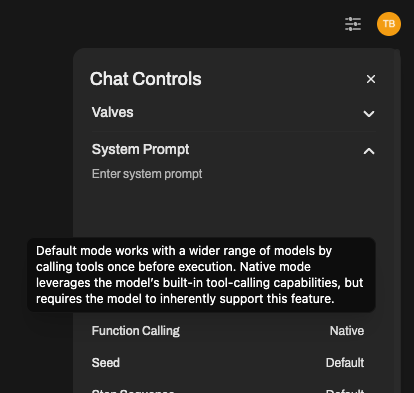
Open WebUI 在模型设置 → 高级参数 → 函数调用中提供两种模式:Native 模式(Agentic 模式)——唯一受支持的模式——以及 Default 模式,仅为向后兼容性保留在 UI 中。
🔴 Default 模式(基于提示)— 遗留/不受支持
Default 模式已过时且不再受支持。此处仅供参考。新部署必须使用 Native 模式;现有部署应迁移。关于 Default 模式行为的错误报告、功能请求和支持问题将不会被处理。
在 Default 模式下,Open WebUI 通过注入一个长提示模板来管理工具选择,引导模型以定制格式输出工具请求。这在 2023 年是合理的方法;自主流提供商和开放权重模型获得适当的函数调用 API 以来,它已经过时了。
为什么它已过时:
- 破坏 KV 缓存。 注入的提示每轮都会改变,阻止 LLM 引擎重用缓存的键值对。每条消息都要再次支付完整的预填充成本。
- 更高的延迟和令牌成本。 每轮都有大量工具描述提示。
- 对多步骤链接不可靠。 解析自然语言工具请求比结构化工具调用更脆弱。
- 无法访问内置系统工具。 记忆、笔记、知识、频道、Agentic Research、交错思考以及工具注入的网络搜索/图像生成/代码解释器功能都是仅 Native 模式可用的。
- 不支持现代能力。 2024 年以来发布的每个新功能都针对 Native 模式。
🟢 Native 模式(Agentic 模式/系统函数调用)— 唯一受支持的模式
Native 模式(也称为 Agentic 模式)利用模型内置的能力处理工具定义并返回结构化工具调用(JSON)。这是所有支持它的模型的推荐模式——包括绝大多数现代模型(2024+)。
Agentic 工具调用需要高质量模型才能可靠工作。 虽然小型本地模型在技术上可能支持函数调用,但它们通常难以完成多步骤工具使用所需的复杂推理。为获得最佳结果,使用前沿模型如 GPT-5、Claude 4.5 Sonnet、Gemini 3 Flash 或 MiniMax M2.5。小型本地模型可能产生格式错误的 JSON 或无法遵循 Agentic 行为所需的严格状态管理。
为什么使用 Native 模式(Agentic 模式)?
- 速度与效率:避免大量基于提示的工具选择,延迟更低。
- KV 缓存友好:工具定义作为结构化参数发送(而不是注入提示中),因此不会使轮次间的 KV 缓存失效。这可以显著降低延迟和令牌成本。
- 可靠性:遵循工具模式的准确性更高(使用质量模型)。
- 多步骤链接:对于需要连续调用多个工具的 Agentic Research 和交错思考至关重要。
- 自主决策:模型可以决定何时搜索、使用哪些工具以及如何组合结果。
- 系统工具:只有 Native 模式才能解锁内置系统工具(记忆、笔记、知识、频道等)。
如何启用 Native 模式(Agentic 模式)
Native 模式可以在两个级别启用:
- 所有模型的通用默认值(最快——推荐):
- 导航到管理面板 → 设置 → 模型。
- 点击模型列表右上角的设置按钮——这将打开全局模型参数,适用于你实例中的每个模型(当前和未来),除非特定模型覆盖它们。
- 在模型参数下,将函数调用设置为
Native。 - 保存。所有尚未明确设置自己值的现有模型以及你之后添加的所有模型都继承
Native。你不需要逐一编辑它们。
- 按模型覆盖:
- 在管理面板 → 设置 → 模型中,选择特定模型并点击其编辑按钮。
- 在模型参数下,将函数调用设置为
Native。此值仅覆盖该模型的全局默认值。 - 当特定模型需要不同参数时使用此选项——否则优先使用全局设置。
- 按对话覆盖:
- 在对话中,打开对话控制(右侧边栏)。
- 在高级参数下,将函数调用设置为
Native。仅适用于该对话。
厌倦了逐个将每个模型切换到 Native?全局模型参数面板(管理面板 → 设置 → 模型右上角的设置按钮)让你配置任何模型参数——function_calling、temperature、top_p、max_tokens 等——一次性,适用于 Open WebUI 实例中的每个模型。在那里设置的值成为每个尚未覆盖它们的现有模型和你之后添加的每个模型的默认值。在那里设置 Function Calling = Native,保存,完成。
DEFAULT_MODEL_PARAMS推荐使用 UI 路径,但如果你完全通过环境变量来配置实例,也可以用 DEFAULT_MODEL_PARAMS 设置同样的全局默认值:
DEFAULT_MODEL_PARAMS: '{"function_calling": "native"}'这等效于在上面“全局模型参数”面板中设置 Function Calling = Native:它会成为每个尚未自行覆盖的模型的默认值。这里没有独立的 FUNCTION_CALLING_MODE(或类似)变量——function_calling 是 DEFAULT_MODEL_PARAMS 内部的一个键。
模型要求与注意事项
为了获得可靠的 Agentic 工具调用体验,建议使用高质量前沿模型:
- GPT-5 (OpenAI)
- Claude 4.5 Sonnet (Anthropic)
- Gemini 3 Flash (Google)
- MiniMax M2.5
这些模型在多步骤推理、正确的 JSON 格式化以及自主工具选择方面表现尤为出色。
- 大型本地模型:大型本地模型(如 Qwen 3 32B、Llama 3.3 70B、DeepSeek V3/R1)通常能很好地配合 Native 模式工作,效果会随模型质量提升而明显改善。
- 小型本地模型:小型本地模型(约 30B 参数以下)即使在 Native 模式下,也经常输出格式错误的 JSON,或无法完成多步骤工具链。正确的解决方法是为工具调用场景使用更强的模型,而不是退回到 Default 模式——Default 已属遗留方案且不再受支持。如果你的硬件条件迫使你使用小模型,就需要接受该层级下工具调用不稳定的现实,或只把需要调用工具的对话卸载给云端模型。
已知的模型特定问题
DeepSeek V3.2 在原生函数调用方面存在已知问题,并且会导致可稳定复现的失败。尽管它是 600B+ 参数级别的大模型,却经常输出格式错误的工具调用。
问题根源:DeepSeek V3.2 在训练时使用了一种名为 DSML(DeepSeek Markup Language) 的专有工具调用格式。使用原生函数调用时,模型有时会输出原始 DSML/XML 风格语法,而不是标准 JSON:
<functionInvoke name="fetch_url">instead of valid JSON<function_calls>/</function_calls>tags in content- Garbled hybrid text like
prominentfunction_cinvoke name="search_parameter
为什么会这样:这是一种高度依赖模型本身的行为,由 DeepSeek 的微调过程引入。DeepSeek 选择让模型学习 DSML,而不是标准 OpenAI 风格的 JSON 工具调用。尽管一些推理服务商(如 VertexAI、OpenRouter 等)会尝试拦截 DSML 片段并转换成 OpenAI 风格 JSON,但在某些条件下(流式输出、高温度、高并发、多轮对话)这层转换并不可靠。主要责任在 DeepSeek,因为它采用了需要脆弱翻译层支撑的非标准格式。
已知诱因:
- 较高的 temperature 往往会带来更多格式错误输出
- 多轮对话(6-8 轮以上)可能导致模型完全停止调用函数
- 复杂的多步骤工作流(15-30 次工具调用)可能导致“schema drift”,即参数格式逐渐劣化
临时规避方案:
- 为 Agentic 工作负载换用其他模型。 Claude 4.5 Sonnet、GPT-5、Gemini 3 Flash 和 MiniMax M2.5 在 Native 模式下都更可靠,是 DeepSeek V3.2 表现异常时的推荐替代。
- 在 DeepSeek V3.2 上使用工具调用时,适当降低 temperature。
- 限制多轮工具调用会话的长度。
即使针对 DeepSeek,Default 模式也不是受支持的规避方案——它已是遗留模式,未来也不会为此扩展支持。这是 DeepSeek 模型/API 的问题,而不是 Open WebUI 的问题。Open WebUI 已按标准 OpenAI 格式正确发送工具定义;格式错误输出源自 DeepSeek 内部的非标准 DSML 格式。
| 特性 | Default 模式(遗留 / 不受支持) | Native 模式(唯一受支持的模式) |
|---|---|---|
| 状态 | ❌ 遗留模式,已不再支持 | ✅ 必需 —— 所有模型都应使用它 |
| 延迟 | 中 / 高 | 低 |
| KV 缓存 | ❌ 每轮都会破坏缓存 | ✅ 对缓存友好 |
| 模型兼容性 | 任意文本模型(已不再重要) | 2024 年以来的所有主流模型 |
| 执行逻辑 | 由 Open WebUI 解析提示注入 | 由提供商 API 处理结构化工具调用 |
| 系统工具 | ❌ 不可用 | ✅ 完整访问(Memory、Notes、Knowledge、Channels、Web Search、Image Gen、Code Interpreter) |
| Agentic Research / 交错思考 | ❌ 不支持 | ✅ 支持 |
| 复杂链式调用 | ⚠️ 不可靠 | ✅ 表现优秀 |
| 未来开发方向 | ❌ 无 | ✅ 所有新功能都只面向此模式 |
内置系统工具(Native/Agentic 模式)
🛠️ 当启用 Native 模式(Agentic 模式) 时,Open WebUI 自动注入强大的系统工具。这解锁了真正的 Agentic 行为,使有能力的模型(如 GPT-5、Claude 4.5 Sonnet、Gemini 3 Flash 或 MiniMax M2.5)能够自主执行多步骤研究、探索知识库或管理用户记忆。
| Tool | Purpose |
|---|---|
| Search & Web | Requires ENABLE_WEB_SEARCH enabled AND per-chat "Web Search" toggle enabled. |
search_web | Search the public web for information. Best for current events, external references, or topics not covered in internal documents. |
fetch_url | Visits a URL and extracts text content via the Web Loader. |
| Knowledge Base | Requires per-model "Knowledge Base" category enabled (default: on). Which tools are injected depends on whether the model has attached knowledge — see note below. |
list_knowledge | List attached knowledge (KBs, files, notes). Start here when attachments exist. |
list_knowledge_bases | List accessible knowledge bases with file counts. |
query_knowledge_bases | Semantic search over KB names/descriptions to find the right KB. |
search_knowledge_bases | Text search over KB names/descriptions. |
query_knowledge_files | Search file contents via the RAG retrieval pipeline (hybrid + rerank when enabled). Main tool for finding answers in docs. |
search_knowledge_files | Search files by filename. |
grep_knowledge_files | Exact text / regex search across knowledge file content. Returns matching lines with line numbers. Complements query_knowledge_files (semantic) when you need literal matches. |
view_file | Read a user-accessible file by ID with character pagination (offset, max_chars) or line range (start_line, end_line, optional line_numbers). |
view_knowledge_file | Read a knowledge-base file by ID with pagination (offset, max_chars). |
kb_exec (opt-in) | Filesystem-style command interface for knowledge bases (ls, tree, cat, head, tail, sed, grep, find, wc, stat, with pipe support). Directory-aware: ls docs/, tree, grep "x" docs/, and path-based file refs (docs/api/auth.md). Replaces the discovery/read tools above when ENABLE_KB_EXEC is set. |
| Image Gen | Requires image generation enabled (per-tool) AND per-chat "Image Generation" toggle enabled. |
generate_image | Generates a new image based on a prompt. Requires ENABLE_IMAGE_GENERATION. |
edit_image | Edits existing images based on a prompt and image URLs. Requires ENABLE_IMAGE_EDIT. |
| Code Interpreter | Requires ENABLE_CODE_INTERPRETER enabled (default: on) AND per-chat "Code Interpreter" toggle enabled. |
execute_code | Executes code in a sandboxed environment and returns the output. |
| Memory | Requires Memory feature enabled AND per-model "Memory" category enabled (default: on). |
search_memories | Searches the user's personal memory/personalization bank. |
add_memory | Stores a new fact in the user's personalization memory. |
replace_memory_content | Updates an existing memory record by its unique ID. |
delete_memory | Deletes a memory by its ID. |
list_memories | Lists all stored memories for the user with content and dates. |
| Notes | Requires ENABLE_NOTES AND per-model "Notes" category enabled (default: on). |
search_notes | Search the user's notes by title and content. |
view_note | Get the full markdown content of a specific note. |
write_note | Create a new private note for the user. |
replace_note_content | Update an existing note's content or title. |
| Chat History | Requires per-model "Chat History" category enabled (default: on). |
search_chats | Simple text search across chat titles and message content. Returns matching chat IDs and snippets. |
view_chat | Reads and returns the full message history of a specific chat by ID. |
| Channels | Requires ENABLE_CHANNELS AND per-model "Channels" category enabled (default: on). |
search_channels | Find public or accessible channels by name/description. |
search_channel_messages | Search for specific messages inside accessible channels. |
view_channel_message | View a specific message or its details in a channel. |
view_channel_thread | View a full message thread/replies in a channel. |
| Task Management | Requires per-model "Task Management" category enabled (default: on). |
create_tasks | Create a structured task checklist for the current chat. Called once at the start of multi-step work to define all steps. |
update_task | Update the status of a single task by id (pending, in_progress, completed, cancelled). Called after finishing each step. |
| Automations | Requires per-model "Automations" category enabled (default: on) AND ENABLE_AUTOMATIONS enabled AND user has features.automations permission (admins always pass). |
create_automation | Create a scheduled automation with a name, prompt, and RRULE schedule. Uses the current chat model. |
update_automation | Update an existing automation's name, prompt, schedule, or model. |
list_automations | List the user's scheduled automations with status, schedule, and next runs. |
toggle_automation | Pause or resume a scheduled automation. |
delete_automation | Delete a scheduled automation and all its run history. |
| Calendar | Requires per-model "Calendar" category enabled (default: on) AND ENABLE_CALENDAR enabled AND user has features.calendar permission (admins always pass). |
search_calendar_events | Search calendar events by text and/or date range across all accessible calendars. |
create_calendar_event | Create a new event on the user's default or specified calendar. |
update_calendar_event | Update an existing event's title, time, description, location, or cancel it. |
delete_calendar_event | Delete a calendar event permanently. |
| Skills | Requires at least one skill to be attached to the model via Workspace/Admin Panel → Models → Edit → Skills. The model receives a summary of attached skills in its system prompt and can call view_skill to load full instructions on demand. No separate builtin tools category checkbox is needed — attaching a skill is the only requirement. |
view_skill | Load the full instructions of a skill by name. The tool is injected when skills are attached; resolving a skill still follows normal ownership/access-grant checks. |
| Time Tools | Requires per-model "Time & Calculation" category enabled (default: on). |
get_current_timestamp | Get the current UTC Unix timestamp and ISO date. |
calculate_timestamp | Calculate relative timestamps (e.g., "3 days ago"). |
知识工具可用性(速览)
用这张速查表即可,无需死记每一行的注释说明。
| Tool | Model has attached knowledge | Model has no attached knowledge |
|---|---|---|
list_knowledge | ✅ | ❌ |
list_knowledge_bases | ❌ | ✅ |
search_knowledge_bases | ❌ | ✅ |
query_knowledge_bases | ❌ | ✅ |
search_knowledge_files | ✅ (auto-scoped) | ✅ (all accessible KBs) |
query_knowledge_files | ✅ (auto-scoped) | ✅ |
grep_knowledge_files | ✅ (auto-scoped) | ✅ |
view_file | ✅ (when attached items include files/collections) | ❌ |
view_knowledge_file | ✅ (when attached items include files/collections) | ✅ |
view_note | ✅ (when attached items include notes) | ❌ |
快速规则:list_knowledge 和 list_knowledge_bases 是互斥的。
kb_exec 时矩阵会被替换当设置了 ENABLE_KB_EXEC 后,Open WebUI 会注入 kb_exec 来取代上面列出的文件相关工具。同时仍会注入的包括:query_knowledge_files(始终)、view_note(当有笔记被附加时),以及 query_knowledge_bases + search_knowledge_bases(当没有 KB 被附加时)。模型通过熟悉的 shell 命令与文件交互。详情请参见 Knowledge 功能页面。
工具参考
| Tool | Parameters | Output |
|---|---|---|
| Search & Web | ||
search_web | query (required), count (default: admin-configured WEB_SEARCH_RESULT_COUNT; capped at admin maximum when provided) | Array of {title, link, snippet} |
fetch_url | url (required) | Plain text content (max 50,000 chars) |
| Knowledge Base | ||
list_knowledge | None | {knowledge_bases: [{id, name, description, file_count, files: [{id, filename}]}], files: [{id, filename}], notes: [{id, title}]} |
list_knowledge_bases | count (default: 10), skip (default: 0) | Array of {id, name, description, file_count} |
query_knowledge_bases | query (required), count (default: 5) | Array of {id, name, description} by similarity |
search_knowledge_bases | query (required), count (default: 5), skip (default: 0) | Array of {id, name, description, file_count} |
query_knowledge_files | query (required), knowledge_ids (optional), count (default: 5) | Array of chunks like {content, source, file_id, distance?}; note hits include {note_id, type: "note"} |
search_knowledge_files | query (required), knowledge_id (optional), count (default: 5), skip (default: 0) | Array of {id, filename, knowledge_id, knowledge_name} |
grep_knowledge_files | pattern (required; regex auto-detected), file_id (optional — single-file mode), case_insensitive (default: false), count_only (default: false) | Matching lines with file IDs, filenames, and 1-indexed line numbers (capped at 50 matches) |
view_file | file_id (required), offset (default: 0), max_chars (default: 10000, cap: 100000), line_numbers (default: false), start_line / end_line (optional — line-based addressing overrides offset/max_chars) | {id, filename, content, updated_at, created_at} — includes truncated, total_chars, next_offset when paginated, or total_lines, showing_lines, next_start_line in line mode |
view_knowledge_file | file_id (required), offset (default: 0), max_chars (default: 10000, cap: 100000) | {id, filename, content, knowledge_id, knowledge_name} — includes pagination metadata when truncated |
kb_exec | command (required) — filesystem-style command: ls (root) / ls <dir>/ / ls -a (flat with paths), tree / tree <dir>/, cat -n <file>, head -N <file>, tail -N <file>, sed -n '<a>,<b>p' <file>, grep [-i|-l|-c] "<pattern>" [<dir>/|<file>|*.ext], find [<dir>/] "<glob>", wc <file>, stat <file>; supports pipes (grep "auth" | head -5); files referenced by path (docs/api/auth.md), filename, or file ID | Plain text command output (matches/listing/tree/file content as appropriate) |
| Image Gen | ||
generate_image | prompt (required) | {status, message, images} — auto-displayed |
edit_image | prompt (required), image_urls (required) | {status, message, images} — auto-displayed |
| Code Interpreter | ||
execute_code | code (required) | {status, stdout, stderr, result} |
| Memory | ||
search_memories | query (required), count (default: 5) | Array of {id, date, content} |
add_memory | content (required) | {status: "success", id} |
replace_memory_content | memory_id (required), content (required) | {status: "success", id, content} |
delete_memory | memory_id (required) | {status: "success", message} |
list_memories | None | Array of {id, content, created_at, updated_at} |
| Notes | ||
search_notes | query (required), count (default: 5), start_timestamp, end_timestamp | Array of {id, title, snippet, updated_at} |
view_note | note_id (required) | {id, title, content, updated_at, created_at} |
write_note | title (required), content (required) | {status: "success", id} |
replace_note_content | note_id (required), content (required), title (optional) | {status: "success", id, title} |
| Chat History | ||
search_chats | query (required), count (default: 5), start_timestamp, end_timestamp | Array of {id, title, snippet, updated_at} |
view_chat | chat_id (required) | {id, title, messages: [{role, content}]} |
| Channels | ||
search_channels | query (required), count (default: 5) | Array of {id, name, description, type} |
search_channel_messages | query (required), count (default: 10), start_timestamp, end_timestamp | Array of {channel_id, channel_name, message_id, content_snippet, is_thread_reply, parent_id, created_at} |
view_channel_message | message_id (required) | {id, content, user_name, created_at, reply_count} |
view_channel_thread | parent_message_id (required) | {channel_id, channel_name, thread_id, message_count, messages: [...]} |
| Task Management | ||
create_tasks | tasks (required): list of {content (required), status (default: pending), id (optional, auto-generated)} | {tasks: [...], summary: {total, pending, in_progress, completed, cancelled}} |
update_task | id (required), status (default: completed; one of pending, in_progress, completed, cancelled) | {tasks: [...], summary: {total, pending, in_progress, completed, cancelled}} |
| Automations | ||
create_automation | name (required), prompt (required), rrule (required) | {status, id, name, model_id, is_active, next_runs} |
update_automation | automation_id (required), name, prompt, rrule, model_id (all optional — only provided fields are changed) | {status, id, name, model_id, is_active, next_runs} |
list_automations | status (optional: "active", "paused", or omit for all), count (default: 10) | {automations: [{id, name, prompt_snippet, model_id, rrule, is_active, last_run_at, next_runs}], total} |
toggle_automation | automation_id (required) | {status, id, name, is_active} |
delete_automation | automation_id (required) | {status, message} |
| Calendar | ||
search_calendar_events | query (optional), start (optional datetime string, e.g. "2026-04-20 00:00"), end (optional datetime string), count (default: 10) | {events: [{id, calendar_id, title, description, start, end, all_day, location, color, is_cancelled}], total} |
create_calendar_event | title (required), start (required datetime string), end (optional), description (optional), calendar_id (optional — uses default calendar), all_day (default: false), location (optional) | {status, id, calendar_id, title, start, end, ...} |
update_calendar_event | event_id (required), title, description, start, end, all_day, location, is_cancelled (all optional — only provided fields are changed) | {status, id, title, start, end, ...} |
delete_calendar_event | event_id (required) | {status, message} |
| Skills | ||
view_skill | name (required) | {name, content} |
| Time Tools | ||
get_current_timestamp | None | {current_timestamp, current_iso} |
calculate_timestamp | days_ago, weeks_ago, months_ago, years_ago (all default: 0) | {current_timestamp, current_iso, calculated_timestamp, calculated_iso} |
Open WebUI 在你登录时自动检测并存储你的时区。这允许与时间相关的工具和功能提供准确的本地时间,无需任何手动配置。你的时区由浏览器设置确定。
知识工具的可用性根据模型是否有附加知识而变化。使用上面的知识工具可用性矩阵作为参考依据。
- 有附件时:模型获得范围限定的知识工具。
- 无附件时:模型获得 KB 发现工具。
list_knowledge和list_knowledge_bases是互斥的。
将知识库附加到自定义模型不会绕过访问控制。当用户与模型聊天时,query_knowledge_files 会检查该特定用户是否有权访问每个附加的知识项目。用户无法访问的项目会被静默排除在搜索结果之外。
按知识类型的访问要求:
| Attached Type | User Needs |
|---|---|
| Knowledge Base (collection) | Owner, admin, or explicit read access grant |
| Individual File | Owner or admin only (no access grants) |
| Note | Owner, admin, or explicit read access grant |
Example scenario: An admin creates a private knowledge base and attaches it to a custom model shared with all users. Regular users chatting with this model will get empty results from query_knowledge_files because they don't have read access to the KB itself — even though they can use the model.
Solution: Make sure users who need access to the model's knowledge also have read access to the underlying knowledge base (via access grants or group permissions in the Knowledge settings).
有附加知识时:
- 首先调用
list_knowledge发现附加的 KB、文件和笔记 - 使用
query_knowledge_files搜索文件内容(自动范围限定为附件) - 使用
view_file或view_knowledge_file读取特定文件——对大文件使用offset和max_chars
无附加知识时:
- 首先调用
list_knowledge_bases发现可用的知识 - 然后使用
query_knowledge_files在相关 KB 中搜索文件内容 - 如果仍然为空,文件可能尚未嵌入,或者你可能启用了全文上下文模式,该模式绕过向量存储
不要将全文上下文模式与知识工具一起使用——全文上下文直接注入文件内容而不存储嵌入,因此 query_knowledge_files 将返回空。使用聚焦检索(默认)进行基于工具的访问。
当在管理设置中启用 ENABLE_RAG_HYBRID_SEARCH 时,原生 query_knowledge_files 工具使用混合搜索 + 重排序,为你提供与标准 RAG 管道相同的搜索质量。当混合搜索禁用时,它回退到简单的向量搜索。
重要: 使用 Native 函数调用时,附加知识不会自动注入到对话里。模型必须主动调用知识工具来搜索并检索信息。
如果你的模型没有使用附加知识:
- 在系统提示词中加入明确指令,要求模型先发现再查询知识库。例如:“当用户提问时,先使用
list_knowledge查看可用知识,再用query_knowledge_files搜索相关知识库后再回答。如果该模型未附加知识,请先调用list_knowledge_bases来发现可用 KB。” - 或者为该模型禁用 Native Function Calling,恢复自动 RAG 注入。
- 或者把附件切换为“全文上下文”模式(点击附件并选择 “Use Entire Document”),这样会始终直接注入全文内容。
为什么要使用这些工具? 因为它们能支持 深度研究(多次搜索网页或反复查询知识库)、上下文感知(查阅历史对话或笔记)、动态个性化(保存事实)以及 精确自动化(基于既有笔记或文档生成内容)。
禁用内置工具(按模型)
你可以在 Workspace > 模型 编辑器的 Capabilities 区域,按模型开启或关闭 Builtin Tools。启用后(默认状态),使用 Native 模式时会自动注入上面列出的所有系统工具。
何时适合禁用 Builtin Tools:
| Scenario | Reason to Disable |
|---|---|
| Model doesn't support function calling | Smaller or older models may not handle the tools parameter correctly |
| Simpler/predictable behavior needed | You want the model to work only with pre-injected context, no autonomous tool calls |
| Security/control concerns | Prevents the model from actively querying knowledge bases, searching chats, accessing memories, etc. |
| Token efficiency | Tool specifications consume tokens; disabling saves context window space |
禁用 Builtin Tools 后会发生什么:
- No tool injection: The model won't receive any of the built-in system tools, even in Native Mode.
- RAG still works (if File Context is enabled): Attached files are still processed via RAG and injected as context.
- No autonomous retrieval: The model cannot decide to search knowledge bases or fetch additional information—it works only with what's provided upfront.
细粒度内置工具分类(按模型)
当 Builtin Tools 能力已启用时,你还可以进一步控制模型可用的内置工具类别。在模型编辑器中,这会显示为 Builtin Tools 下的一组复选框。

| Category | Tools Included | Description |
|---|---|---|
| Time & Calculation | get_current_timestamp, calculate_timestamp | Get current time and perform date/time calculations |
| Memory | search_memories, add_memory, replace_memory_content, delete_memory, list_memories | Search and manage user memories |
| Chat History | search_chats, view_chat | Search and view user chat history |
| Notes | search_notes, view_note, write_note, replace_note_content | Search, view, and manage user notes |
| Knowledge Base | list_knowledge, list_knowledge_bases, search_knowledge_bases, query_knowledge_bases, search_knowledge_files, query_knowledge_files, grep_knowledge_files, view_file, view_knowledge_file (or kb_exec + query_knowledge_files + view_note/query_knowledge_bases/search_knowledge_bases as applicable when ENABLE_KB_EXEC is set) | Browse and query knowledge bases |
| Web Search | search_web, fetch_url | Search the web and fetch URL content |
| Image Generation | generate_image, edit_image | Generate and edit images |
| Code Interpreter | execute_code | Execute code in a sandboxed environment |
| Channels | search_channels, search_channel_messages, view_channel_message, view_channel_thread | Search channels and channel messages |
| Task Management | create_tasks, update_task | Create a structured task/todo list and update individual task statuses in the active chat |
| Automations | create_automation, update_automation, list_automations, toggle_automation, delete_automation | Create and manage scheduled automations from chat |
| Calendar | search_calendar_events, create_calendar_event, update_calendar_event, delete_calendar_event | Search, create, update, and delete calendar events |
All categories are enabled by default. Disabling a category prevents those specific tools from being injected, while keeping other categories active.
view_skill 工具不会出现在 Builtin Tools 分类复选框中。只有当至少一个技能通过 Workspace → 模型 → 编辑 → Skills 附加到模型时,它才会被注入。附加技能后:
- 模型会通过
<available_skills>标签,在系统提示词中收到每个附加技能的摘要(名称 + 描述) - 系统会注入
view_skill工具,供模型按需加载完整说明 - 如果没有附加技能,
view_skill就不可用
用户也可以按对话选择技能(通过聊天输入栏),此时会直接把技能完整内容注入系统提示词,而无需调用 view_skill。
适合使用细粒度控制的场景:
| Scenario | Recommended Configuration |
|---|---|
| Privacy-focused model | Disable Memory and Chat History to prevent access to personal data |
| Read-only assistant | Disable Notes (prevents creating/modifying notes) but keep Knowledge Base enabled |
| Minimal token usage | Enable only the categories the model actually needs |
| Knowledge-centric bot | Disable everything except Knowledge Base and Time |
这些分类级开关只会在主 Builtin Tools 能力启用时出现。如果你完全关闭 Builtin Tools,那么无论类别设置如何,都不会注入任何工具。
启用某个模型级分类开关不会覆盖全局功能开关。比如,如果 ENABLE_NOTES 在全局(管理面板)被关闭,那么即便模型启用了 “Notes” 分类,笔记工具也仍然不可用。模型级开关只能在已可用的基础上进一步收紧,不能开启全局已禁用的功能。
那些对应到 RBAC 功能权限的内置工具,同样受用户 Features 权限约束。即便某个工具分类已在模型上启用,且全局功能开关也是开启状态,只要用户缺少对应的 features.* 权限,该工具就不会被注入。管理员始终通过这些权限检查。
| Tool Category | Required features.* Permission |
|---|---|
| Memory | features.memories |
| Web Search | features.web_search |
| Image Generation | features.image_generation |
| Code Interpreter | features.code_interpreter |
| Notes | features.notes |
| Channels | features.channels |
| Automations | features.automations |
| Calendar | features.calendar |
这确保了 RBAC 权限在端到端链路中都被真正执行——禁用某项功能后,不只是 UI 被隐藏,模型也无法代表用户调用对应工具。
Web Search、Image Generation 和 Code Interpreter 这些内置工具还有额外一层控制:聊天输入栏中的按对话功能开关。在 Native 模式下,要让这些工具被注入,必须同时满足以下三个条件:
- 全局配置已启用 —— 该功能已在管理面板中打开(如
ENABLE_WEB_SEARCH) - 模型能力已启用 —— 该模型在 Workspace > 模型 中已勾选相应能力(如 “Web Search”)
- 按对话开关已启用 —— 用户已在当前聊天的输入栏开关中启用该功能
这意味着,即便某项能力已在全局和模型层面启用,用户仍可在单个对话中关闭网页搜索(或图像生成、代码解释器)。这对于必须离线处理信息的对话,或需要防止意外工具调用的场景非常有用。
如果希望用户开箱即拥有完整 Agentic 体验,管理员可以把 Web Search、Image Generation 和 Code Interpreter 设为模型默认功能。在 Admin Panel > Settings > Models 中找到目标模型的 Model Specific Settings,并在 Default Features 下启用这三项。这样它们会默认在每个新对话中生效,用户无需逐一手动打开。若有需要,用户仍然可以在单个对话中将其关闭。
Builtin Tools 控制的是模型是否获得用于自主检索的工具。它不控制文件内容是否通过 RAG 注入——那是独立的 File Context 能力负责的。
- File Context = Whether Open WebUI extracts and injects file content (RAG processing)
- Builtin Tools = Whether the model gets tools to autonomously search/retrieve additional content
See File Context vs Builtin Tools for a detailed comparison.
交错思考
🧠 在使用 Native 模式(Agentic 模式) 时,顶级模型可以启用 交错思考(Interleaved Thinking)。这是一种强大的"思考 → 行动 → 思考 → 行动 → 思考 → ……"循环,模型可以在其中推理任务、执行一个或多个工具、评估结果,然后决定下一步动作。
交错思考要求模型具备强大的推理能力。此功能在能够跨多次工具调用维持上下文、并就何时使用哪些工具做出智能决策的前沿模型(GPT-5、Claude 4.5+、Gemini 3+)上表现最佳。
这与单次工具调用有本质区别。在交错工作流中,模型遵循以下循环:
- 推理:分析用户意图并识别信息缺口。
- 行动:调用工具(例如使用
query_knowledge_files查询内部文档,或使用search_web和fetch_url进行网络研究)。 - 思考:读取工具输出并更新其内部理解。
- 迭代:若答案仍不清晰,则调用另一个工具(例如
view_knowledge_file读取特定文档,或fetch_url读取特定页面),或优化检索。 - 收尾:只有完成这一"深度研究"循环后,模型才会给出最终且基于事实的答案。
这种行为正是将一个普通的聊天机器人转变为能够自主解决复杂、多步骤问题的 Agentic AI 的关键所在。
对于长时间运行的工作流,可将交错工具调用与 create_tasks(预先规划计划)和 update_task(在每个步骤完成后标记)结合使用,以便模型能够显式规划、跟踪进度,并与用户对齐下一步操作。
🚀 Summary & Next Steps
Tools bring your AI to life by giving it hands to interact with the world.
- Browse Tools: openwebui.com/search
- Advanced Setup: Learn more about MCP Support
- Development: Writing your own Custom Toolkits